Used Greenshot on Windows?
Greenshot
for Mac.
Greenshot is free and still updated on Windows. Its Mac version is a separate $1.99 app, last updated in June 2020, before Apple silicon, so newer Macs run it through Rosetta, which Apple keeps from macOS 28 only for certain older games. SnapApp is a free native Mac app for the Greenshot habit: capture a region, draw, highlight or obfuscate, and copy it, with most of the same tool letters.
macOS 14 Sonoma or later · Apple silicon & Intel · 3.6 MB · Free, Pro optional · No account
Where Greenshot stands
- On Windows
- Free and open source. Version 1.3.315 came out on March 20, 2026, as Windows files only.
- On a Mac
- A separate app, Greenshot 1.2.19 on the Mac App Store, for $1.99, released June 29, 2020.
- On Apple silicon
- It predates the first Apple silicon Macs, so they run it through Rosetta (Does It ARM has no report of a native version).
- From macOS 28
- Apple keeps Rosetta only for certain older, unmaintained games, and says other Intel-based apps will not work (Apple Support).
To check your copy, select Greenshot in the Finder and press Command + I. “Application (Intel)” after Kind means it runs through Rosetta.
Your Greenshot keys, on a Mac
Greenshot’s default capture keys on Windows and the closest keys built into macOS.
- Capture a region
- Greenshot
- Macthen drag
- Capture the last region again
- Greenshot
- MacNo built-in key
- Capture a window
- Greenshot
- Mac
- Capture the full screen
- Greenshot
- Mac
⌃ Control · ⇧ Shift · ⌘ Command. Greenshot keys from its help page, Mac keys from Apple’s screenshot guide. SnapApp adds one more: captures a region straight into its editor.
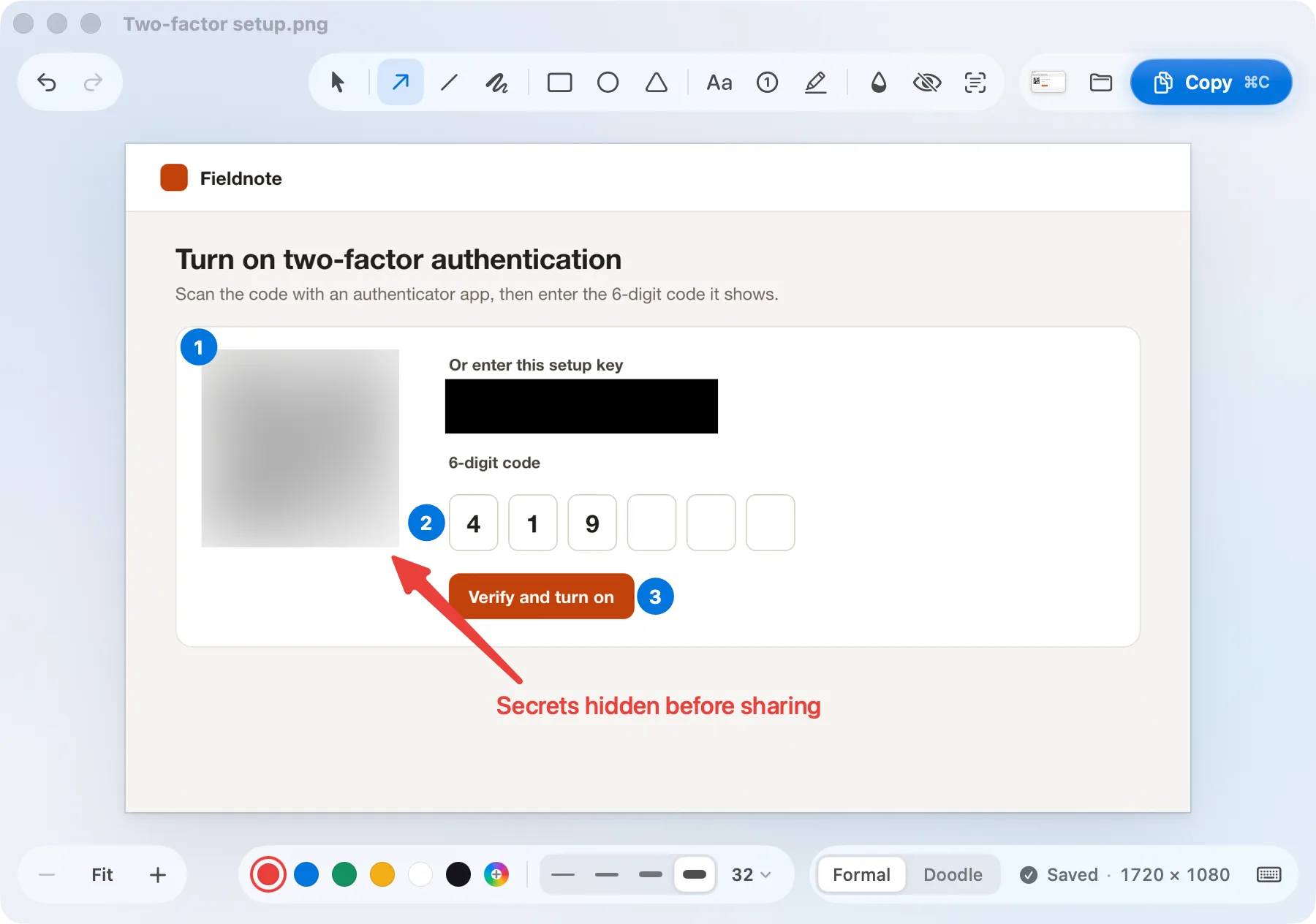
Every Greenshot habit, on a Mac.
What you do in Greenshot’s editor, with the built-in Mac way and the SnapApp way side by side, including what neither does.
Draw shapes
- In Greenshot
- Rectangle R, ellipse E, line L, arrow A, freehand F
- Built into macOS
- Shapes and Sketch in Markup
- With SnapApp
- Box R, oval O, line L, arrow A and pen P, plus a triangle G. Shift snaps lines and arrows to 45° steps.
Add text
- In Greenshot
- Text T
- Built into macOS
- Text in Markup
- With SnapApp
- Text T: click and type on the image.
Highlight
- In Greenshot
- Highlight H: text, area, grayscale or magnify
- Built into macOS
- Highlight shape in Markup
- With SnapApp
- Highlight H: recognized words, a marker stroke or an area. No grayscale or magnifier.
Obfuscate
- In Greenshot
- Obfuscate O: pixelize or blur
- Built into macOS
- No blur in Markup; cover it with a filled shape
- With SnapApp
- Blur U, which also pixelates, on an area or recognized words, or Redact B in solid ink. Blur or redact?
Crop
- In Greenshot
- Crop C
- Built into macOS
- Crop in Markup
- With SnapApp
- Choose the area when you snip. There is no crop tool afterwards.
Copy it
- In Greenshot
- Ctrl + Shift + C
- Built into macOS
- copies instead of saving.
- With SnapApp
- Command + C copies it and closes the editor.
Save it
- In Greenshot
- Ctrl + S, or Save as with Ctrl + Shift + S
- Built into macOS
- Saved to the desktop by default
- With SnapApp
- Saved automatically as a PNG in Pictures, in a SnapApp folder.
Email it
- In Greenshot
- Ctrl + E attaches it to a new email
- Built into macOS
- Drag the saved file into Mail
- With SnapApp
- Drag the snip from the editor into Mail, a chat or Finder.
Print it
- In Greenshot
- Ctrl + P
- Built into macOS
- File > Print in Preview
- With SnapApp
- Not included. Open the PNG in Preview to print it.
Three ways to replace Greenshot on a Mac.
Buy Greenshot for Mac
The $1.99 Mac App Store version runs through Rosetta on macOS 27 and earlier, and natively on Intel Macs. It has not been updated since June 2020, and macOS may warn you when you open it that Intel-based apps will not work with macOS 28.
Use what macOS has
Shift + Command + 4 captures a region, adding Control copies it, and the floating thumbnail opens Markup for shapes, text and crop. There is no blur and no pixelate.
Every built-in shortcutKeep the habit with SnapApp
- The same letters for box, line, arrow, text and highlight, plus blur, redaction and numbered steps.
- Free and native on Apple silicon and Intel. A 3.6 MB app, notarized by Apple.
- Snips stay on your Mac.

SnapApp doesn’t recapture the last region, crop after capture, or gray out and magnify areas. For scrolling captures, Shottr takes them, and CleanShot X records the screen as MP4 or GIF.
Greenshot on a Mac, answered.
Is there a Greenshot for Mac?
Yes, as a separate app on the Mac App Store: Greenshot 1.2.19, $1.99, last updated on June 29, 2020. Greenshot for Windows is free and open source, and its latest release came out in March 2026.
Is Greenshot for Mac free?
No. Greenshot is free on Windows, but the Mac App Store version costs $1.99.
Does Greenshot work on Apple silicon Macs?
Yes, through Rosetta. Greenshot 1.2.19 was released before the first Apple silicon Macs, so they translate it. Apple says Rosetta is available on macOS 27 or earlier, and starting with macOS 28 only for certain older, unmaintained games.
Will Greenshot for Mac work on macOS 28?
On a Mac with Apple silicon, not unless it gets an Apple silicon version: Apple says Intel-based apps will not work with macOS 28, apart from certain older games. On an Intel Mac, it runs without Rosetta.
What is the Mac shortcut for Greenshot's Print Screen?
Shift + Command + 4, then drag across the area, saves it as a file; add Control to copy it instead. Shift + Command + 3 captures the full screen. In SnapApp, the default is Command + Shift + 2, and you can record your own.
How do I obfuscate part of a screenshot on a Mac?
Markup, the built-in editor, has no blur or pixelate tool, so you would cover the detail with a filled shape. In SnapApp, press U for Blur, switch to Pixelate if you like, and drag over the detail, or press B for Redact to cover it in solid ink.
Is there a free Greenshot alternative for Mac?
SnapApp is a free native app for Apple silicon and Intel Macs (macOS 14 Sonoma or later). It uses the same letters as Greenshot for the box, line, arrow, text and highlight tools, all free; numbered steps and text recognition come with SnapApp Pro.
Is SnapApp made by the Greenshot team?
No. SnapApp is an independent Mac app with no connection to Greenshot or its developers.
Greenshot, Rosetta and Markup details checked on October 3, 2026, against Greenshot’s own site, help and releases, the Mac App Store and Apple’s support guides. SnapApp is not affiliated with Greenshot or its developers.