Switching from Windows?
ShareX
for Mac?
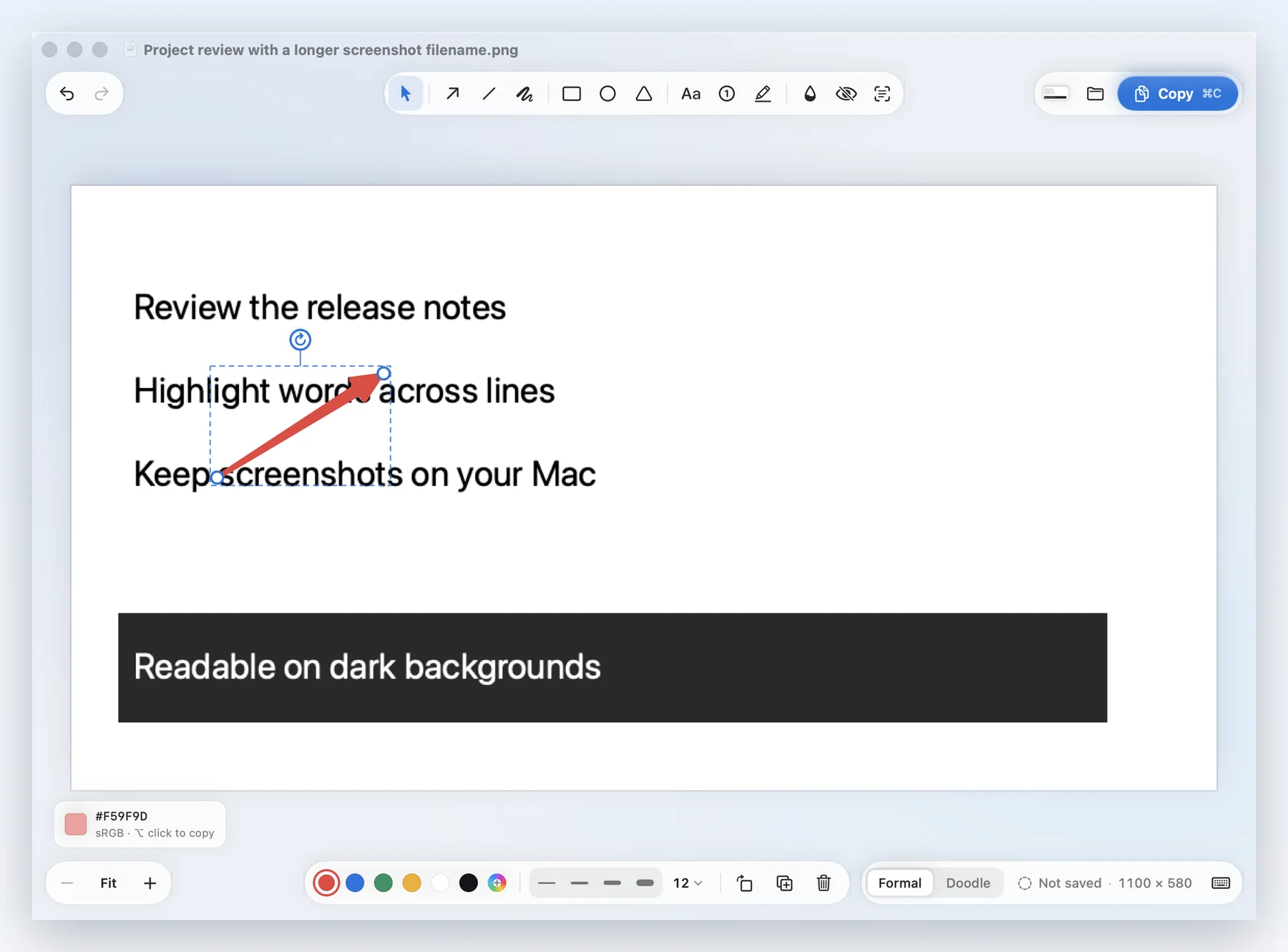
ShareX runs only on Windows. On a Mac, Shift + Command + 4 does what its Ctrl + Print Screen does: drag across an area and it is captured. For the ShareX editor habit of arrows, numbered steps, blur, text recognition and a color picker, SnapApp is a free native Mac app that opens every snip straight in its editor. The ShareX team is also building XerahS, a cross-platform version with early Mac builds.
macOS 14 Sonoma or later · Apple silicon & Intel · 3.6 MB · Free, Pro optional · No account
Your ShareX hotkeys, on a Mac
ShareX’s five default hotkeys and the closest keys built into macOS.
- Capture a region
- ShareX
- Macthen drag
- Capture the entire screen
- ShareX
- Mac
- Capture the active window
- ShareX
- Mac
- Record the screen
- ShareX
- Macthen Record
- Record a GIF
- ShareX
- MacNo built-in GIF recording
⌃ Control · ⇧ Shift · ⌘ Command. Mac keys from Apple’s screenshot guide. SnapApp adds one more: captures an area straight into its editor.
Every ShareX habit, on a Mac.
Each ShareX habit, with the built-in Mac way and the SnapApp way side by side, including what neither does.
Capture a region
- In ShareX
- Ctrl + Print Screen, then drag
- Built into macOS
- then drag
- With SnapApp
- then drag. The screen freezes first, so open menus stay put.
Draw arrows, shapes and text
- In ShareX
- Region capture tools and the image editor
- Built into macOS
- Click the floating thumbnail to open Markup
- With SnapApp
- Arrows, lines, boxes, ovals, triangles, pen and text, in Formal or Doodle style. Draw past an edge and the canvas grows.
Number the steps
- In ShareX
- Step tool
- Built into macOS
- Not in Markup
- With SnapApp
- Click to add the next numbered step.
Highlight
- In ShareX
- Highlight tool
- Built into macOS
- Highlight shape in Markup
- With SnapApp
- Highlight recognized words, drag a marker stroke, or highlight an area.
Blur or pixelate
- In ShareX
- Blur and Pixelate tools
- Built into macOS
- Not in Markup
- With SnapApp
- Blur or pixelate an area or recognized words, from Light to Max. How to blur on a Mac
Hide private details
- In ShareX
- Pixelate, or a filled rectangle
- Built into macOS
- Cover them with a filled shape in Markup
- With SnapApp
- Redact covers an area or recognized words in solid ink.
Copy text from it
- In ShareX
- Recognize text (OCR)
- Built into macOS
- Open it in Preview and select the text with Live Text
- With SnapApp
- Extract copies the recognized words. Recognition runs on your Mac.
Pick a color
- In ShareX
- Color picker and screen color picker
- Built into macOS
- Digital Color Meter in Utilities. Shift + Command + C copies the value.
- With SnapApp
- Hover over a snip to read a pixel's hex value. Option-click copies it.
Copy to the clipboard
- In ShareX
- After capture: copy image to clipboard
- Built into macOS
- copies instead of saving
- With SnapApp
- Press Command + C in the editor. It copies and closes.
Save every capture
- In ShareX
- After capture: save image to file
- Built into macOS
- Saved to the desktop, or where you choose in the toolbar Options
- With SnapApp
- Saved as a PNG in Pictures, in a SnapApp folder, named after the app and window you captured.
Record the screen
- In ShareX
- Screen recording, or a GIF
- Built into macOS
- then Record. It saves a video, not a GIF.
- With SnapApp
- Not included.
Scrolling capture
- In ShareX
- Scrolling capture
- Built into macOS
- Not built in
- With SnapApp
- Not included.
Pin to screen
- In ShareX
- Pin to screen
- Built into macOS
- Not built in
- With SnapApp
- Not included.
Upload and share a link
- In ShareX
- Upload to a host you choose, then copy the link
- Built into macOS
- Not built in
- With SnapApp
- Not included. Snips stay on your Mac until you paste or send them.
Three ways to replace ShareX.
Stay with the ShareX team
XerahS is the ShareX team’s free, open-source, cross-platform reimagining of ShareX, with builds for Apple silicon and Intel Macs. Its site says it is in development and preview, with most functions still being worked on, and its download page shows how to get past macOS’s “damaged and can’t be opened” warning in Terminal.
Use what macOS has
The built-in shortcuts capture, the Screenshot toolbar records, Markup adds shapes and text, Live Text copies words and Digital Color Meter reads colors. Enough when you rarely add more than a quick mark.
Every built-in shortcutSnip to explain with SnapApp
- One shortcut, then an editor with numbered steps, blur, redaction and text recognition.
- A native 3.6 MB app, notarized by Apple.
- Snips stay on your Mac.

For the parts of ShareX that SnapApp leaves out: Shottr takes scrolling screenshots, pins captures on screen and uploads to S3, and CleanShot X records MP4 or GIF and shares links through CleanShot Cloud.
ShareX on a Mac, answered.
Is there a ShareX for Mac?
ShareX itself runs only on Windows. The ShareX team is building XerahS, a separate cross-platform app with early macOS builds. On a Mac today, the built-in shortcuts cover capturing, and SnapApp is a native app for the ShareX-style editor: arrows and a color picker for free, with numbered steps, blur and text recognition in SnapApp Pro.
What is the Mac shortcut for ShareX's Ctrl + Print Screen?
Shift + Command + 4, then drag across the area. Add Control (Control + Shift + Command + 4) to copy the capture instead of saving a file. In SnapApp, the default is Command + Shift + 2, and you can record your own.
How do I blur part of a screenshot on a Mac?
Markup, the built-in editor, has no blur tool, so you would cover the area with a filled shape. SnapApp blurs or pixelates an area or recognized words, and Redact covers details in solid ink.
Can a Mac copy text from a screenshot like ShareX's OCR?
Yes. Open the screenshot in Preview and select the text with Live Text. In SnapApp, Extract copies the recognized words, and recognition runs on your Mac.
Is there a color picker like ShareX's on a Mac?
Digital Color Meter, in the Utilities folder, shows the value of any pixel on screen, and Shift + Command + C copies it as text. In SnapApp, hover over a snip to read a pixel's hex value, and Option-click to copy it.
Does SnapApp upload screenshots like ShareX?
No. SnapApp keeps every snip on your Mac and never uploads it. Press Command + C to copy it, or drag it from the editor into a chat, an email or Finder.
Is SnapApp free?
SnapApp is free to download and free for capturing and marking up with arrows, shapes, a pen, text and highlights, with no account. Blur, redaction, numbered steps and text recognition are part of SnapApp Pro: $2.90 a month or $29 a year with a 14-day free trial, or $89 once. It runs on macOS 14 Sonoma or later, on Apple silicon and Intel Macs.
Is SnapApp made by the ShareX team?
No. SnapApp is an independent Mac app with no connection to ShareX or the ShareX Team.
ShareX, XerahS, Shottr and CleanShot X details checked on September 30, 2026, against each project’s own site and releases. SnapApp is not affiliated with ShareX or the ShareX Team.